Receipt App for Canadian Contractors and Tradespeople
Nabbit is a receipt capture app built for Canadian contractors and tradespeople. It photographs job site receipts, reads the vendor, amount, and HST automatically, and sends clean coded expenses to QuickBooks Online Canada with no paper pile at month end.
Why Contractors Lose More ITCs Than Anyone Else
Trades work generates more receipts than almost any other business type — materials, fuel, tools, subcontractors — and most of those receipts come from suppliers, hardware stores, and fuel stations that print on thermal paper. Thermal paper fades within two to five years. CRA requires you to keep records for six years. That gap costs Canadian contractors thousands of dollars in denied Input Tax Credits every year.
The second problem is distance. When your crew is at a job site in Brampton and you're quoting in Mississauga, there's no reliable process for collecting their receipts. They pile up in trucks, get left on dashboards, or end up photographed in a group chat that no one can organize at year end.
How Does Nabbit Work for Contractors?
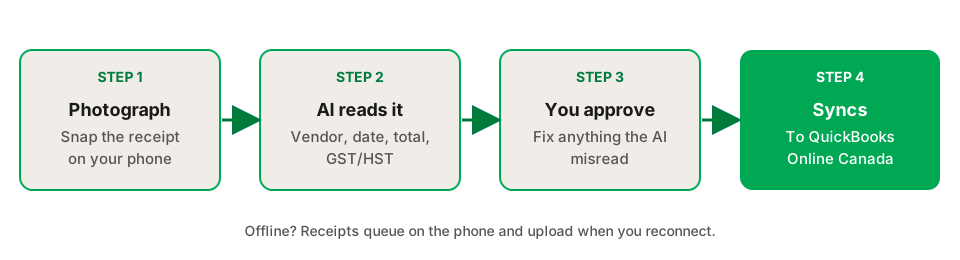
Nabbit is three steps: photograph the receipt, review the AI reading, and approve. The expense appears in QuickBooks automatically.
- Photograph at the counter. Your crew snaps a receipt on their phone using the Nabbit app. No internet required — receipts queue and sync when they reconnect.
- AI reads vendor, amount, and HST. Within 15 seconds Nabbit extracts the vendor name, date, total, and HST amount. GST and HST are separated from the base amount automatically, so your ITC claim is already calculated.
- Review and approve. You or your bookkeeper reviews expenses in the Nabbit dashboard, assigns the expense category (materials, fuel, subcontractor), and approves. The coded expense syncs to QuickBooks Online Canada — no double entry.
Stop losing receipts on job sites
Free 14-day trial. Connect QuickBooks Online Canada in under 10 minutes.
Start Free Trial →What Nabbit Captures Automatically
| What it reads | How it works |
|---|---|
| Vendor name | Extracted from the receipt and matched against your QuickBooks vendor list |
| Date | Read from the receipt — not the capture date |
| Total amount | Extracted in CAD with no currency conversion |
| GST / HST amount | Separated automatically from the base amount and coded to the correct tax line |
| Receipt image | Stored at full resolution for CRA's 6-year retention requirement |
| Province HST rate | Applied from vendor location — Ontario 13%, Alberta 5% GST, etc. |
Is Nabbit CRA-Compliant for Contractor Records?
Yes. CRA accepts digital images of paper receipts as sufficient documentation for ITC claims, provided the image is legible and includes all required fields. Nabbit stores full-resolution images in a secure archive, indexed by date, vendor, and amount. Every receipt is retrievable in seconds — which matters when an auditor asks for every HST receipt from 2022.
For purchases of $100 or more — common for material purchases at Home Depot, Rona, or a local electrical supplier — CRA requires the vendor's HST registration number to appear on the receipt. Nabbit flags receipts where this field is missing so you can follow up before the expense is approved.
Team Workflows for Crews
Nabbit is built for multi-person trades businesses. Field workers capture receipts on their phones; the office manager or bookkeeper reviews and approves from a browser. No one needs to mail paper receipts or photograph and text a group chat.
Approved expenses sync to QuickBooks with the correct expense category, vendor, and HST amount. Your accountant sees organized, coded records at year end instead of a box of faded thermal paper.
Frequently Asked Questions
Sources
The rules on this page come from these Canada Revenue Agency publications. Check them for the current wording, because CRA updates its guidance.
- Input tax credits, Canada Revenue Agency
- T4002 Self-employed Business, Professional, Commission, Farming, and Fishing Income, Canada Revenue Agency
- Where to keep your records, for how long, and how to request permission to destroy them early, Canada Revenue Agency